
Written by Izabela Matei, Marketing Manager & AI adoption Enthusiast
AI Data Security Risks: How to Use AI in Business Without Exposing Sensitive Information
Ever pasted a client document into ChatGPT just to “summarize it quickly”? You’re not alone and that’s exactly the problem.
AI is now part of everyday work. But while teams are moving fast, data protection isn’t keeping up.
Sensitive contracts, financial data, internal conversations, they’re all one prompt away from being exposed to systems you don’t control. Most AI tools are not designed for enterprise security.
So, the real question isn’t “Should we use AI?” It’s: “How do we use AI without losing control of our data?”
Let’s break down what’s happening under the hood and why platforms like Microsoft Copilot are fundamentally safer for business use.
Understanding AI in Business: LLMs, AI Agents, and Agentic AI Explained
What are we actually talking about? AI is often used as a blanket term, but there are important differences:
LLM (Large Language Model):
The core AI model (like GPT) that understands and generates text.
AI Agents:
Systems built on top of LLMs that can take actions, summarize documents, send emails, and automate workflows.
Agentic AI:
A newer concept where AI systems don’t just respond. They plan, decide, and execute tasks autonomously across tools and workflows.
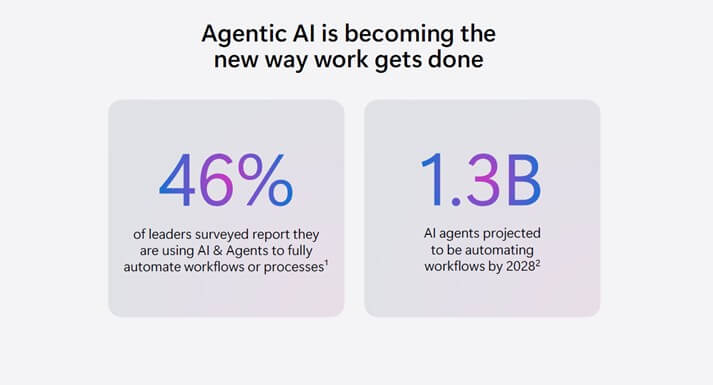
According to Microsoft, this shift is already happening fast, with AI agents expected to automate workflows at a massive scale in the coming years.
Why AI Adoption Is Accelerating and Why Security Is Falling Behind
AI is no longer experimental. It is becoming part of how companies operate on a daily basis, embedded directly into workflows rather than used as a standalone tool.
Teams now rely on AI to:
- Draft and respond to emails
- Analyze datasets and extract insights
- Generate reports and presentations
- Automate repetitive business processes
Microsoft describes this shift as the “Agentic System of Work”, a model where AI is integrated into everyday tasks and decision-making, not just used on demand.
The challenge is that adoption is happening faster than governance.
Most AI tools currently in use:
- Do not understand the structure of your organization
- Do not enforce your internal access controls
- Do not integrate with your existing security policies
They operate in isolation from the systems that define how your data should be handled.
This creates a clear imbalance. On one hand, organizations gain speed and efficiency. On the other hand, they lose visibility and control over how sensitive data is accessed, processed, and shared.
That gap between productivity and protection is where most AI-related risks emerge.
Who Is Responsible for AI Data Security in Business? (It’s Not Just IT)
The risks associated with AI are often treated as a technical concern, but in practice, they extend far beyond IT.
Business leaders are driving AI adoption to improve efficiency and reduce operational friction. Every decision to introduce AI into workflows directly affects how company data is handled.
IT teams remain responsible for governance, security, and compliance. They are expected to enforce policies, maintain visibility, and ensure that data remains protected, even as new tools are introduced.
Engineers and architects play a critical role in integrating AI into systems and processes. Their design choices determine how data flows, what controls are applied, and where potential exposure points exist.
As AI becomes embedded into everyday operations, these roles become increasingly interconnected. Decisions made in one area, whether business, technical, or operational, have direct consequences for data security.
If your organization is already using AI, or planning to adopt it, this is no longer optional knowledge. It is a shared responsibility that requires coordination across the entire business.
The Hidden Risks of Using Public AI Tools in Business
Most public AI platforms (e.g., ChatGPT, Google Gemini, Anthropic Claude) operate on a straightforward request-response model:
- A user inputs data into a prompt
- The request is sent to an external AI service
- The model processes the data
- A response is returned
From a usability perspective, this is excellent. From a security and governance perspective, it introduces multiple risks that are often overlooked.
What Actually Happens to Your Data
When an employee pastes content into a public AI tool, several things typically occur:
- The data is transmitted outside your corporate environment
- It is processed in infrastructure you do not control
- It may be logged, cached, or retained depending on the provider
- It is not evaluated against your internal security policies
Even if a provider states that data is “not used for training,” that does not automatically mean the data is not stored temporarily, the request is not logged or that the content is not accessible for debugging or system improvement. From an IT perspective, this creates a blind spot.
Why This Breaks Your Security Model
Most organizations invest heavily in controls such as:
- Identity-based access (who can see what)
- Data classification (what is sensitive)
- DLP policies (where data can go)
- Audit logs (who accessed or shared data)
Public AI tools bypass all of these.
Example:
A document stored in SharePoint:
- Might be restricted to a specific team
- Labeled as “Confidential”
- Protected by DLP policies
The moment an employee copies that content into a public AI tool:
- Those controls are no longer enforced
- The classification is lost
- The access boundary disappears
In practice, this means your most sensitive data becomes just plain text in an external system.
Loss of Visibility and Control
From an IT operations perspective, one of the biggest issues is lack of observability.
With public AI tools:
- There is no centralized logging of prompts
- No visibility into what data was shared
- No ability to audit or investigate usage
- No enforcement of retention or deletion policies
This becomes critical in scenarios such as security incidents, compliance audits, and legal investigations. If data was exposed through an AI tool, most organizations simply cannot answer what exactly was shared, by whom, and when.
Real-World Example: Samsung Data Leak (2023)
In 2023, Samsung engineers unintentionally leaked sensitive data while using a public AI tool to assist with their work. This included proprietary source code, internal meeting notes, and operational information.
The data was submitted directly into the AI system, outside the company’s-controlled environment. Following multiple incidents, Samsung restricted the use of generative AI tools internally, highlighting how easily sensitive information can leave an organization without proper governance.
Why Employees Use Unapproved AI Tools and Why It Won’t Stop
Even in well-managed organizations, employees consistently adopt tools that make their work faster and easier. When existing systems introduce friction, whether through slow processes, limited functionality, or complex access controls, people look for alternatives that help them move faster.
AI tools are particularly effective at removing that friction. They provide immediate results with minimal effort, which makes them highly attractive in day-to-day work.
This behavior is often misunderstood as a training or compliance issue. It is primarily a system design issue.
If secure, approved tools are not easily accessible, simple to use and integrated into existing workflows, employees will default to whatever solution helps them complete their tasks efficiently.
From a security perspective, this is predictable. Productivity-driven behavior will always take priority unless the secure option is also the most practical one.
That is why controlling AI usage is not about restricting access, but more about providing governed alternatives that align with how people actually work.
Why Microsoft Copilot Is Safer for Business Data Than Public AI Tools
1. What This Means in Practice
The most important advantage of Copilot is that your data remains inside your environment.
When a user interacts with Copilot, whether in Outlook, Teams, Word, or Excel, the data is processed within your Microsoft 365 tenant. It is not copied into an external tool or handled outside your organization’s control boundaries.
This has several direct implications:
First, Copilot respects your existing permissions model. If a user does not have access to a document, Copilot cannot retrieve or expose it. There is no shortcut around access control, and no “AI layer” that overrides security settings.
Second, all existing security policies continue to apply. Controls such as Conditional Access, Data Loss Prevention (DLP), and sensitivity labels are enforced automatically. If a document is classified as confidential or restricted from external sharing, those rules still apply when Copilot interacts with it.
Nuances often missed:
- Sensitivity labels do not automatically block Copilot processing unless paired with DLP policies.
- Overshared permissions can still surface sensitive data.
This means security is only as good as tenant configuration.
Third, data interactions remain visible and auditable. Unlike public AI tools, where prompts and data usage are often outside of IT visibility, Copilot provides significantly stronger auditing and visibility, though audit completeness depends on workload and configuration.
2. Beyond Security: Why This Also Improves Productivity
These security foundations are not just about risk reduction, they directly enable more effective use of AI.
Because Copilot operates within your environment, it can:
- summarize internal documents without exposing them externally
- generate reports using real company data
- draft emails based on your context, meetings, and files
- assist in Teams conversations with relevant organizational knowledge.
In other words, it doesn’t just generate generic responses, it works with your actual business data, safely.
This is a key distinction. Public AI tools require users to manually provide context, often by copying and pasting sensitive information. Copilot removes that step, reducing both friction and risk at the same time.
3. Built for Governance, Not Just Access
Another important difference is that Copilot is designed to be managed as part of an enterprise system.
Organizations can:
- control who has access to Copilot features
- monitor adoption and usage patterns
- enforce governance policies across users and data
- measure the business impact of AI usage.
This aligns with Microsoft’s broader approach to AI, where security, compliance, and management are built into the platform, not added later.
How to Secure AI in Business: What IT Teams Must Put in Place First
Securing AI in a business context starts with a clear principle: AI is not an add-on. It is part of your infrastructure. And like any critical system, it needs to be designed and managed accordingly.
In practice, this means aligning AI usage with the same controls that govern the rest of your IT environment.
It begins with identity and access control. Every interaction with AI is tied to a user, so enforcing strong authentication and limiting access is essential. Multi-Factor Authentication and Conditional Access policies ensure that only trusted users, from compliant locations and devices, can interact with company data. Privileged Identity Management (PIM) reduces the risk of excessive permissions by granting elevated access only when needed.
From there, attention shifts to endpoint security. AI is accessed through user devices, which means those devices must meet defined security standards. Solutions like Microsoft Intune and Defender ensure that only compliant, protected endpoints can access corporate resources, reducing the risk of data leakage from compromised or unmanaged devices.
The next layer is data and communication protection. Data Loss Prevention (DLP) policies help prevent sensitive information from being shared outside approved channels, whether through email, Teams, or other collaboration tools. This is particularly important in an AI context, where data is frequently processed and transformed.
Equally important is data governance. Organizations need to understand what data they have, how sensitive it is, and who should have access to it. Sensitivity labels, controlled external sharing, and structured data classification ensure that AI systems interact with data in a controlled and predictable way.
Finally, visibility and monitoring are critical. AI usage must be observable. IT teams need to track how tools are being used, audit access patterns, and identify potential risks early. Without this layer, even well-designed controls can be bypassed without detection.
Where Optimizor Adds Value
While these principles are straightforward, implementing them correctly is not.
Most organizations already have Microsoft 365 in place, but the reality is that these environments are often only partially configured. Permissions are too broad, policies are inconsistent, and governance is reactive rather than structured.
This is where Optimizor brings measurable value.
With deep expertise (20 years) in Microsoft 365 and hands-on experience across identity, security, and automation, Optimizor helps organizations move from a basic setup to a controlled, AI-ready environment. This includes:
- reviewing and restructuring access models
- implementing Conditional Access and PIM correctly
- deploying DLP and data classification policies aligned with business needs
- securing endpoints through Intune and Defender
- establishing governance and monitoring frameworks for AI usage
Beyond configuration, the focus is on practical adoption. AI should not be introduced in isolation. It should be integrated into workflows in a way that is both secure and efficient.
This is where combining Microsoft expertise with technical understanding of AI becomes critical. It allows organizations to not only protect their data, but also use AI effectively, without introducing unnecessary risk or complexity.
AI in Business: A Competitive Advantage Only If It’s Controlled
AI is already part of how modern businesses operate. The real question is not whether to adopt it, but whether your environment is ready to support it safely.
Tools like Microsoft Copilot make it possible to use AI within your existing systems, without moving data outside your control. But the outcome still depends on how well your environment is configured.
If access is not properly managed, data is not classified, or sharing is not controlled, AI will simply surface those gaps faster.
This is why AI adoption should be treated as an infrastructure decision, not just a feature rollout.
For organizations that want to move forward confidently, the priority is clear: make sure the foundation is ready.
At Optimizor, we help companies do exactly that. We assess Microsoft 365 environments, identify risks, and implement the controls needed to use AI securely and efficiently.
If you are planning to adopt Microsoft Copilot, or already using AI tools, this is the right time to validate your setup.
 Contact us for a Microsoft 365 Security & AI Readiness assessment and ensure your AI strategy is built on the right foundation.